We have compiled a list of manufacturers, distributors, product information, reference prices, and rankings for Design support software.
ipros is IPROS GMS IPROS One of the largest technical database sites in Japan that collects information on.

Design support software(3D CAD) - List of Manufacturers, Suppliers, Companies and Products

Last Updated: Aggregation Period:Dec 03, 2025~Dec 30, 2025
This ranking is based on the number of page views on our site.

Design support software Product List

1~6 item / All 6 items

Displayed results

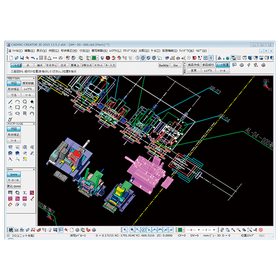
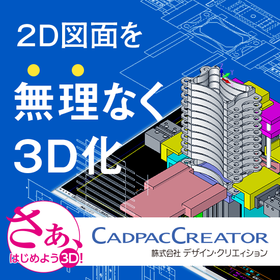
Realizing 'effortless 3D conversion' by leveraging the strengths of each aspect of 2D and 3D CAD.

Create a 3D model from the conceptual diagram of 2DCAD. Editing and modifications can be intuitively operated with direct modeling using 'CADPAC-CREATOR'.

"Can we smoothly transition from 2D design to 3D design? What changes will occur once we incorporate 3D design?" There may be 2D CAD designers who are pondering these questions. With CADPAC-CREATOR, instead of jumping straight into 3D design, we first create the necessary 3D models using 2D conceptual drawings, and then we conduct detailed design within the 3D environment. CADPAC-CREATOR enables a "natural transition to 3D" that leverages the strengths of both 2D and 3D. ▼Benefits of Introducing CADPAC-CREATOR▼ - Intuitive 3D modeling with a 2D mindset - Prevention of simple mistakes that occurred in 2D - What is difficult in 2D becomes easy in 3D - Effective use of both 2D and 3D to improve design quality

  • iprosメルマガ2311_02.png
  • iprosメルマガ2311_03.png
  • 3D CAD
  • 2D CAD machine
  • Other CAD

Added to bookmarks

Bookmarks list

Bookmark has been removed

Bookmarks list

You can't add any more bookmarks

By registering as a member, you can increase the number of bookmarks you can save and organize them with labels.

Free membership registration

Design Review DX "Issues"

Realizing front-loading through design review DX

Anyone can open a 3D model with one click from any PC at any time, directly annotate in 3D during their free time, and collect tasks without missing anything!

  • Company:Scene
  • Price:Other
  • 3D CAD

Added to bookmarks

Bookmarks list

Bookmark has been removed

Bookmarks list

You can't add any more bookmarks

By registering as a member, you can increase the number of bookmarks you can save and organize them with labels.

Free membership registration

Cyber Ace: Support for the Introduction and Operation of SolidWorks

We will support the introduction and operation of SolidWorks.

We provide support for the introduction of SolidWorks. 【CAD Training】 Training using our original text 【CAD Support】 Assistance when you don't understand the operation or encounter errors 【Implementation Consulting】 Consultation on 3D design rules and environment setup 【3D Data Creation】 Creation of 3D models from 2D drawings and assembly diagrams (such as manuals).

  • Vocational Training/Technical School

Added to bookmarks

Bookmarks list

Bookmark has been removed

Bookmarks list

You can't add any more bookmarks

By registering as a member, you can increase the number of bookmarks you can save and organize them with labels.

Free membership registration

[Data] DX of Mechanical Design and Control Design Using 3D CAD

Includes modeling methods and various usage examples along with graphs and diagrams!

This document introduces "DX in Mechanical Design and Control Design Using 3D CAD." It includes trends and current status of DX, modeling methods, various usage examples, and applications, presented with graphs and diagrams. Please take a look. 【Contents】 ■ Current Status and Challenges of DX ■ Operation Instructions ■ Usage Images ■ Application Images *For more details, please refer to the PDF document or feel free to contact us.

  • Company:ITAGE
  • Price:Other
  • others

Added to bookmarks

Bookmarks list

Bookmark has been removed

Bookmarks list

You can't add any more bookmarks

By registering as a member, you can increase the number of bookmarks you can save and organize them with labels.

Free membership registration

The risk of improper application of geometric tolerances! The causes of increased costs associated with 3D CAD data.

Lack of knowledge in geometric tolerances leads to scrap, rework, and unnecessary expenses.

Geometric Dimensioning and Tolerancing (GD&T) is a powerful tool, but if applied incorrectly, it can lead to inefficiencies that outweigh its benefits. The difficulty designers face in maintaining knowledge of advanced GD&T principles and standards is a backdrop to this issue. Improper application of GD&T can create errors and misunderstandings in drawings and 3D models, ultimately increasing manufacturing costs. Additionally, repeated discussions over GD&T applications and increased review cycles and revisions can lead to decreased productivity and efficiency. Furthermore, mistakes in tolerances directly result in unnecessary expenses such as scrap, rework, changes, confusion, and downtime. The GD&T Advisor helps prevent these risks and enables the proper application of GD&T to increase tolerances and reduce part manufacturing costs. Let’s verify the risks of GD&T misapplication lurking in your design process with specific examples from the materials. *For more details, please download the PDF or feel free to contact us.*

Added to bookmarks

Bookmarks list

Bookmark has been removed

Bookmarks list

You can't add any more bookmarks

By registering as a member, you can increase the number of bookmarks you can save and organize them with labels.

Free membership registration